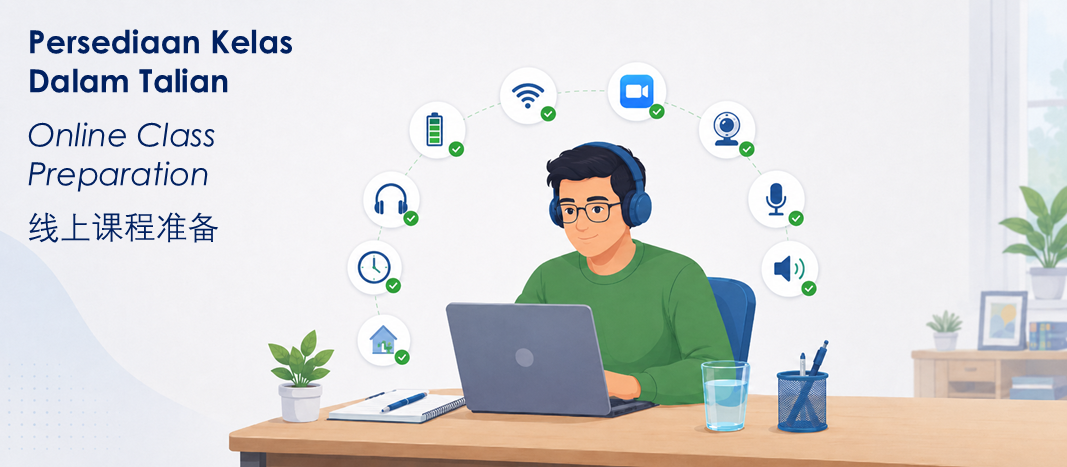
Panduan Persediaan Kelas Dalam Talian
Panduan ini diharap dapat membantu calon kursus dan majikan membuat persediaan sebelum menghadiri kelas Latihan Pengendali Makanan dalam talian Win Synergy Training. Kelas dalam talian merupakan sesi latihan formal. Oleh itu, calon perlu hadir, bersedia di hadapan kamera, boleh dihubungi dan berada dalam kelas sepanjang sesi.
Sila sediakan peranti, sambungan internet, kamera, audio dan persekitaran pembelajaran yang sesuai sebelum kelas bermula. Ini membantu mengelakkan kelewatan, masalah teknikal dan risiko calon tidak menghadiri kelas dengan jayanya.
Sebelum Kelas Bermula

Guna peranti yang sesuai
Gunakan peranti seperti komputer riba, tablet atau telefon pintar yang boleh mengendalikan Zoom dengan lancar. Peranti tersebut mesti menyokong penggunaan kamera, mikrofon, pembesar suara dan sambungan video yang stabil.

Semak capaian internet
Gunakan capaian Wi-Fi atau data mudah alih yang stabil. Internet yang lemah atau tidak stabil boleh menyebabkan capaian terputus secara berulang, atau peserta tidak dapat hadir kursus dengan sepenuhnya.

Muat turun ZOOM awal
Sila pasang dan uji Zoom awal, sebaik-baiknya sehari sebelum kelas. Jangan tunggu sehingga saat akhir untuk memuat turun, memasang atau membuka Zoom.

Bersedia dan log masuk awal
Calon perlu log masuk pada waktu yang telah ditentukan untuk pengambilan kehadiran dan semakan teknikal. Log masuk lewat boleh menjejaskan kehadiran kursus, terutamanya apabila berdepan dengan situasi kesuntukan masa untuk menyelesaikan isu teknikal sebelum sesi bermula.
Semasa Kelas Dalam Talian

Bersedia untuk kelas
Sediakan pengecas, power bank, penyangga telefon, cermin mata membaca (jika perlu), pad penyejuk peranti, buku nota, pen atau apa-apa kelengkapan lain yang difikirkan perlu sebagai sokongan kepada peranti atau untuk keselesaan peserta sendiri semasa sesi pembelajaran.

Sentiasa pasang kamera
Calon perlu boleh dilihat di hadapan kamera sepanjang sesi agar tenaga pengajar dapat membuat pengesahkan kehadiran calon yang didaftarkan sepanjang tempoh masa kelas berlangsung.

1 calon 1 peranti
Setiap calon yang didaftarkan perlu log masuk menggunakan peranti sendiri. Setiap calon perlu dapat dilihat dan memberi maklum balas secara langsung apabila dipanggil oleh tenaga pengajar . Perkongsian peranti antara peserta tidak dibenarkan.

Ambil bahagian secara aktif
Sesi latihan memerlukan komunikasi dua hala. Audio, mikrofon dan kamera pada peranti yang diguna oleh calon perlu boleh berfungsi dengan baik. Calon perlu memberikan maklum balas apabila tenaga pengajar memberi arahan atau bertanya soalan.

Jauhi dari gangguan
Sila log masuk dari tempat yang senyap dan sesuai. Jauhi dari gangguan semasa kelas, termasuk muzik yang kuat, bunyi mesin, pelanggan, sampukan ahli keluarga, atau gangguan lain.

Tidak buat aktiviti lain
Do not attend while working, travelling, sleeping, cooking, watching TV, taking care of children, or doing other tasks at the same time. Other activities may affect learning and attendance verification.
Jangan buat perkara lain seperti bekerja, makan angin, tidur, memasak, menonton TV, menjaga anak atau melakukan lain-lain aktiviti atau tugasan yang tidak berkaitan semasa dalam kelas. Aktiviti-aktiviti yang disebutkan boleh mendatangkan gangguan kepada sesi pembelajaran dan memberi kesan kepada pengesahan kehadiran.

Guna earphone
Setiap calon perlu menggunakan fon telinga (earphone) atau fon kepala (headphone) jika ada beberapa calon menyertai kelas dari bilik yang sama atau kawasan pejabat yang sama. Ini membantu mengurangkan gema dan hingar latar apabila lebih daripada satu peranti disambungkan ke kelas dalam talian yang sama.

Peranti dicas secukupnya
Penstriman audio dan video secara langsung semasa kelas boleh menyebabkan bateri peranti cepat kehabisan kuasa. Sediakan alat pengecas dan jika boleh, sambungkan peranti ke bekalan elektrik. Pengecas mudah alih (powerbank) juga disyorkan sebagai sandaran untuk telefon pintar dan tablet.
Senarai Semak Persediaan Calon
Sebelum masuk kelas, sila pastikan:
- Peranti tersedia dan sudah dicas
- Alat pengecas atau pengecas mudah alih tersedia
- Capaian internet stabil
- Zoom boleh dibuka
- Kamera berfungsi
- Mikrofon dan pembesar suara berfungsi
- Fon telinga tersedia, sekiranya perlu

- Calon log masuk awal sebelum kelas mula
- Calon duduk di tempat yang senyap
- Calon boleh dilihat dengan jelas di hadapan kamera
- Calon tidak berkursus sambil bekerja, makan angin, memandu, memasak atau melakukan aktiviti lain
Kepada Para Majikan yang Menguruskan Kehadiran Kursus Pekerja

Majikan digalakkan untuk memberi taklimat kepada calon sebelum hari latihan. Sila pastikan calon mempunyai:
- Peranti yang sesuai
- Capaian internet yang stabil
- Tempat yang senyap untuk hadir kursus
- Masa dan pautan kelas yang betul
- Kemahaman yang jelas tentang keperluan kelas dalam talian
Bagi kakitangan yang hadir semasa waktu bekerja, sila susun jadual bertugas supaya calon boleh menghadiri sesi sepenuhnya tanpa gangguan kerja. Calon yang terganggu berulang kali, terputus hubungan, tidak kelihatan di hadapan kamera atau tidak dapat memberi respons kepada tenaga pengajar semasa kelas boleh hilang kelayakan untuk mendapat sijil.
Sekiranya Calon Tidak Bersedia
Sila berhubung dengan kami sebelum tarikh kelas sekiranya calon tidak mempunyai peranti yang sesuai, capaian internet yang stabil, kamera yang berfungsi atau tempat yang sesuai untuk hadir kursus.
Dalam situasi sebegini, penjadualan semula mungkin adalah pilihan yang lebih baik berbanding meminta calon hadir juga dalam keadaan yang tidak sesuai. Penjadualan semula tertakluk kepada ketersediaan tempat dalam sesi pilihan.
Majikan boleh mempertimbangkan sesi latihan secara bersemuka untuk calon yang tidak sesuai dengan kelas dalam talian disebabkan oleh keadaan tertentu (calon di kalangan orang kelainan upaya, OKU)


